Set up two-factor authentication
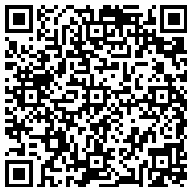
Scan the QR code with the Heimlane Vault mobile app (or your usual authenticator), then enter the generated 6-digit code to verify.
-
Scan the QR code
-
Or enter the secret manually
2PIFCWDJQ5TBVDNBLF2AAP5SIX76MMGO -
Verify with the generated code